
My embroidery machine won’t read my USB drive: what should I check?
Updated · Tanven
In short
When an embroidery machine can’t see the designs on a USB drive, the cause is most often the file format, its name, the folder, the number of designs, the size of the design, or the drive itself. TidyWren copies your designs in the right format, with short names, into the expected folder, and tells you what it sees; for the drive itself, check your machine’s manual too.
Does your machine read this format?
Each brand has its formats: PES for Brother and Baby Lock, JEF for Janome, VP3 for Husqvarna Viking and Pfaff, DST for many others. A designer’s bundle often contains the same design in several formats: copy only the one for your machine.
Is the file name too long?
Some machines won’t show a file with a long name, or with accents and symbols. A short name, without accents, avoids the problem.
Is the design in the right folder?
Some machines only look at the top level of the drive, others in a specific folder: the manual tells you. A design left inside a ZIP file can’t be read by the machine: take it out of the ZIP before you copy it.
Are there too many designs on the drive?
Brother says so in its help pages: if the machine shows “Reduce the number of patterns”, the drive may hold more than 200 designs, or designs with too many colors. Keep only what you’re about to stitch on the drive.
Does the design fit your hoop?
A design larger than the machine’s largest hoop may be ignored or refused. See Does this design fit my hoop?
What about the drive itself?
Most embroidery machines read drives formatted as FAT32. Some don’t accept large drives: the manual gives the maximum size. Formatting a drive erases everything on it: first copy what you want to keep.
With TidyWren
In a design’s details, choose “Copy for my…”. TidyWren picks the format your machine reads and puts it in the folder the brand expects, under a short name without accents; the list of the real names stays on your PC.
Before writing anything, it checks that it really is a removable drive, and looks at its file system and free space. If the drive isn’t FAT32, it tells you. For the Brother machines concerned, it warns you when the drive would go over 200 designs. A design too big for your hoops is only copied if you choose to copy it.
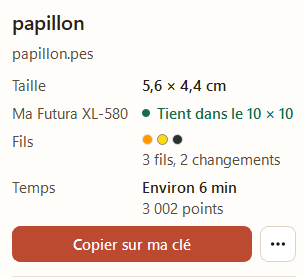
Copying is part of the 150-file trial, then of the license. TidyWren copies, it doesn’t move: your original files never change.
What TidyWren doesn’t do
- TidyWren doesn’t format the drive, and doesn’t know the maximum drive size for each machine.
- It doesn’t eject the drive: do that from File Explorer before you unplug it.
- It only sends designs to the machine by way of the USB drive.
- It doesn’t promise that the machine will read every file.
Our sources
- Brother USA, help article “Reduce the number of patterns” (article 66887), read on November 12, 2026: https://help.brother-usa.com/app/answers/detail/a_id/66887
Another question, or a problem? Write to us at contact@tanven.dev. A real person will answer, in French or English.