
PES file: how do you open and view it on your PC?
Updated · Tanven
In short
A PES file is an embroidery design, in the format used by Brother and Baby Lock machines. Windows can’t open it; TidyWren shows it as a picture, with its size, thread colors, and stitch count, without changing it.
What’s inside a PES file?
A PES file doesn’t contain a photo of the design, but the path of the needle: every stitch, every thread change, and the planned colors. That’s what your embroidery machine reads. Double-clicking the file does nothing in Windows, unless software that reads this format is installed.
How can you see a PES file without your machine?
- With your machine’s embroidery software, if you have it.
- With Silhouette Studio Designer Edition Plus: according to Silhouette America, this edition also opens PES, DST, EXP, JEF, and XXX files.
- With software that adds pictures of your designs in Windows File Explorer.
Before you copy it to the USB drive
Check three things: its size in millimeters (it must fit within your hoop’s embroidery area), the number of colors, and the format your machine reads. A Brother machine reads PES; another brand may need a different format.
With TidyWren
Open “My collection”: every PES file has its picture there. Click the design to open its details: its size, whether it fits your hoops, its thread colors and color changes, the estimated stitching time, and the stitch count. The play button on the picture shows the design stitching out, stitch by stitch.
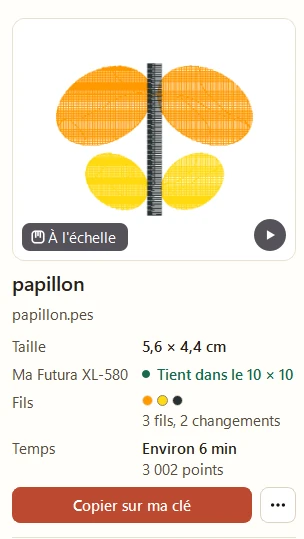
Seeing your designs, their details, and their pictures is free, with no time limit. Copying for your machine is part of the 150-file trial, then of the license.
What TidyWren doesn’t do
- TidyWren doesn’t change a design’s stitches: it isn’t software for creating or editing embroidery designs.
- Formats kept locked by their vendor, such as EMB and ART, are recognized but not opened: export them as PES, DST, or JEF from the original software.
Our sources
- Silhouette America, “File Types and Features” (updated August 13, 2025), read on November 12, 2026: https://silhouetteamerica.freshdesk.com/support/solutions/articles/35000282776-file-types-and-features
Another question, or a problem? Write to us at contact@tanven.dev. A real person will answer, in French or English.