
Does this design fit my hoop?
Updated · Tanven
In short
A design fits if its real size, in millimeters, is smaller than your hoop’s embroidery area. Its details tell you whether it fits in your hoop, on your mat, in your laser’s work area or on your print bed.
Where can you find a design’s size?
The size is written in the file itself, and often on the designer’s product sheet, sometimes in inches (“4x4”, “5x7”). That number gives a rough idea: a design sold as “5x7” is often a little smaller than the hoop. Don’t rely on the file name.
Which size matters for the hoop?
What matters is the embroidery area: the space the needle can reach. Your machine’s manual gives it for each hoop. Leave a little margin: a design that touches the edge is risky.
What if it’s just a bit too big?
Shrinking a design brings its stitches closer together. A very small reduction often works; beyond that, you need embroidery software that recalculates the stitches, or the embroidery gets too dense.
Cutting mats and laser work areas
It’s the same question for cutting and engraving: the usable area of a mat or a laser is a little smaller than its overall size. An SVG can also open at a different size depending on the software: check its size in millimeters before you cut.
With TidyWren
Tell TidyWren which machines you have, in “My machine” (“My machines” when you have more than one). After that, each design’s details say it: for example “Fits the 13 × 18 hoop” (your hoop’s size), or a sentence that says why it doesn’t fit. The “To scale” view shows the design on your mat or in your hoop, to scale (not at its actual size), with the margins in millimeters.
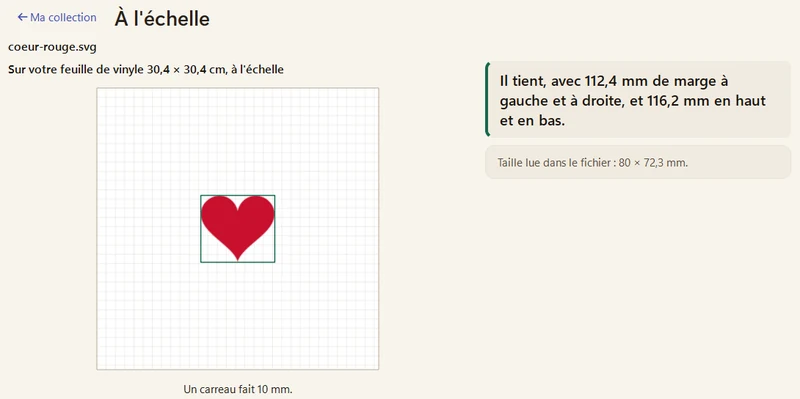
The answer and the “To scale” view are free, with no time limit.
What TidyWren doesn’t do
- Until you tell it your machine, TidyWren doesn’t give an answer.
- When it can only read an estimated size, it says so.
- It doesn’t set the hoop on your machine.
- It only changes the size of a copy if you ask (from 90 to 110% for an embroidery design, to the size you want for an SVG); “Prepare for my machine” also shrinks the copy of an SVG that’s too big for your mat. The original never changes.
- “To scale” is on screen. For the design at actual size on paper: Print an actual-size template.
Another question, or a problem? Write to us at contact@tanven.dev. A real person will answer, in French or English.